
Kafka GUI · Kafka UI for the desktop
A Kafka GUI client that starts in a second, on every OS
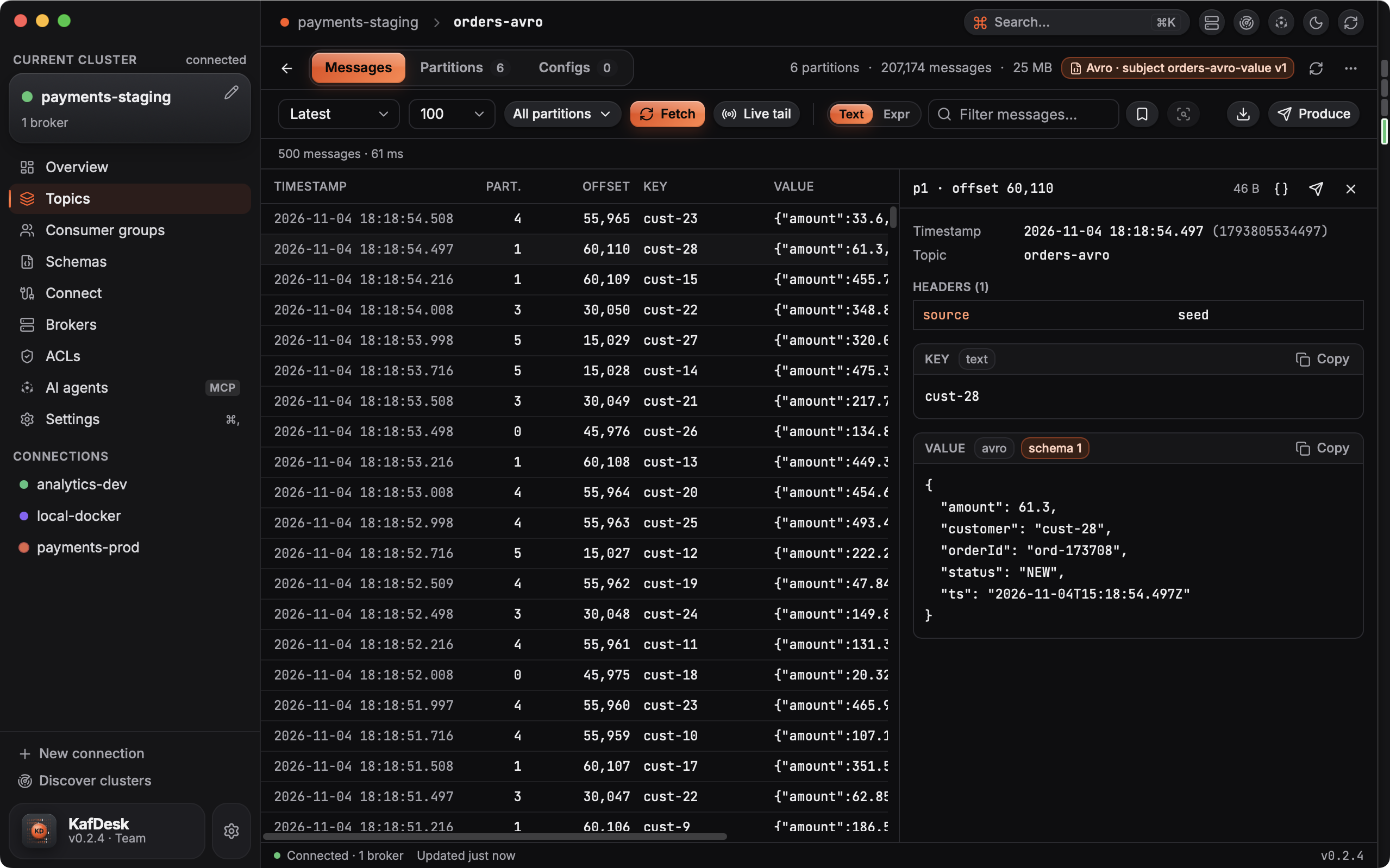
KafDesk is a desktop Kafka UI for developers: one small native app for macOS, Windows and Linux, with no JVM, no server to deploy and no cloud account. Connect to a cluster, browse topics, read and search messages, check consumer-group lag and manage schemas.
What you can do in the Kafka GUI
- Topics: partitions, message counts, size, retention and cleanup policy; create, alter configs, add partitions, empty and delete with a typed confirmation.
- Messages: fetch the latest, from the start, from an offset or a time; live tail; search a topic on the server for text or a filter expression such as
value.status == "PAID"; export NDJSON or CSV; produce with headers and schemas; copy messages to another topic or cluster. - Consumer groups: lag per partition with a trend, why a group lags, offset resets with a dry run.
- Schema Registry and Kafka Connect: subjects, versions, compatibility checks and diffs; connectors and tasks with failure traces, pause, resume and restart.
- Administration: brokers and their configs, ACLs, client quotas, and two clusters compared side by side.
Fast on big topics
KafDesk fetches and decodes 50,000 JSON messages in 0.8 s and searches 1,000,000 messages for a text in 5.5 s (medians of five runs on a 2018 Intel MacBook Pro against Kafka 3.9; how it was measured). The download is 39 MB.
Safe on production clusters
Connections whose name looks like production get a red frame, and every destructive action asks you to type the topic or group name. A connection can be marked read-only, and then neither the app nor AI agents can change anything. Passwords stay in the macOS Keychain, Windows Credential Manager or the Linux Secret Service.
Questions
- Is there a native Kafka GUI for Mac?
- Yes. KafDesk is a native app for macOS 13 or later on Apple silicon and Intel, signed and notarized by Apple. It needs no Java and updates itself.
- Does KafDesk run on Windows and Linux?
- Yes: Windows 10 and 11 on x64 and Arm, and Linux as deb and rpm packages for x86_64 and arm64 (Ubuntu, Debian, Fedora and others).
- Which Kafka clusters can it connect to?
- Apache Kafka, Confluent Platform and Confluent Cloud, Amazon MSK (including IAM auth through your AWS profile or SSO), Redpanda, Strimzi and local Docker clusters, over PLAINTEXT, TLS, SASL PLAIN, SCRAM-SHA-256/512 or OAUTHBEARER, directly or through an SSH tunnel or SOCKS5 proxy.
- Does it decode Avro and Protobuf?
- Yes. Avro, Protobuf and JSON Schema messages are decoded through Schema Registry, and you can produce messages with a schema.
- Is it free?
- Every feature is free for 14 days with no account and no card. After that a Personal licence is $79 once (a year of updates, it keeps working after) and Team seats are $99 per seat a year; maintainers of open-source projects and students get a free licence.